FOCUS report
Last updated on
Understanding cloud cost and usage data is a key skill for effective cost management. At STACKIT, we provide all cost and usage data in a standardized format to help you achieve this understanding. This format is the FinOps Open Cost and Usage Specification (FOCUS). STACKIT supports the FOCUS versions 1.1 and 1.2.
What is FOCUS?
Section titled “What is FOCUS?”The FinOps Open Cost and Usage Specification (FOCUS) is an open specification that defines clear requirements for billing data generators to produce consistent cost and usage datasets.
By supporting this standard, STACKIT enables you to integrate cost and usage data directly into your existing processes and tools. The FOCUS export provides the fundamental data needed to perform FinOps practices, including:
- Accurate cost allocation: Assign costs from the resource to the owners, such as teams, products, or business units.
- Analyzing cost data: Identify cost trends and drivers.
- Cost monitoring: Set alerts, track budgets, and measure cost metrics.
For more details about FOCUS, see https://focus.finops.org. For more information about FinOps, see https://www.finops.org/.
Feature overview
Section titled “Feature overview”- FOCUS version support: STACKIT supports the FOCUS versions 1.1 and 1.2.
- Scope: STACKIT generates the FOCUS report at the billing account level. Right now, each customer account contains only one billing account.
- Column compliance: STACKIT supports all mandatory (MUST) columns defined by the FOCUS specification, which ensures compliance and comprehensive data delivery.
- STACKIT-specific extensions: We provide additional STACKIT-specific columns for enhanced details. These columns use the
x_prefix. NOTE:x_ProjectIdandx_ProjectNamewill be DEPRECATED with a future FOCUS versions above1.2. - Reporting types: STACKIT supports month-to-date and day-to-date reporting types.
- Reporting frequency: You can generate FOCUS reports daily or monthly.
- Report format: STACKIT provides the FOCUS report as a compressed CSV file to ensure efficient data transfer and reduce storage usage.
- Overwriting: You can save Object Storage space by overwriting older files.
Invoice information
Section titled “Invoice information”STACKIT invoices generally become available around the 5th of each month. Once available, we recreate the FOCUS reports for the affected month to include the corresponding InvoiceId and any applied credits.
Planned features
Section titled “Planned features”- FOCUS conformant report certification.
- Additional support columns, such as:
Resource name: This is a human readable name to identify the resource.Folder path: Supports cost allocation.
- FOCUS 1.3 adoption.
Generate a FOCUS report
Section titled “Generate a FOCUS report”Now that you understand the benefits of the FOCUS standard, follow these steps to create your first FOCUS report.
Prerequisites
Section titled “Prerequisites”Before you begin, ensure you have the following in place:
- An active Object Storage service.
- A created bucket within your Object Storage instance.
- Configured access permissions for the Object Storage bucket.
High-level process overview
Section titled “High-level process overview”The process for enabling and receiving the FOCUS report involves the following steps:
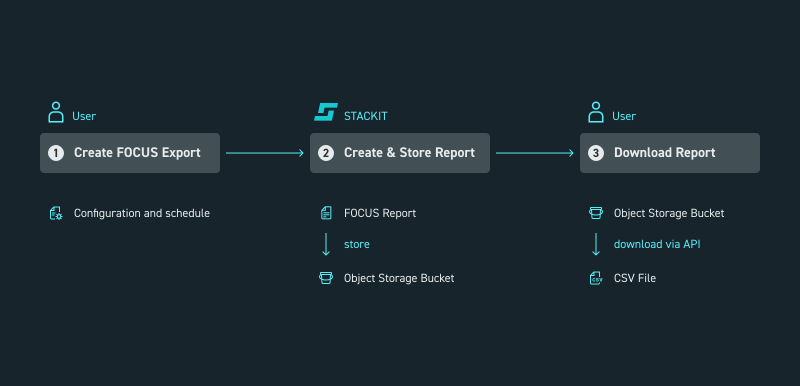
Picture 1: Process to enable the FOCUS report
- Create the FOCUS export schedule.
- STACKIT creates the FOCUS report based on your settings and stores it in your Object Storage at 12:00 UTC.
- Download the report from Object Storage using an API or file transfer client.
Create the FOCUS export schedule
Section titled “Create the FOCUS export schedule”To receive the FOCUS report, you must create a FOCUS export schedule. This schedule defines the parameters for generating and delivering the report. You can only set the schedule within the billing section at the customer account level.
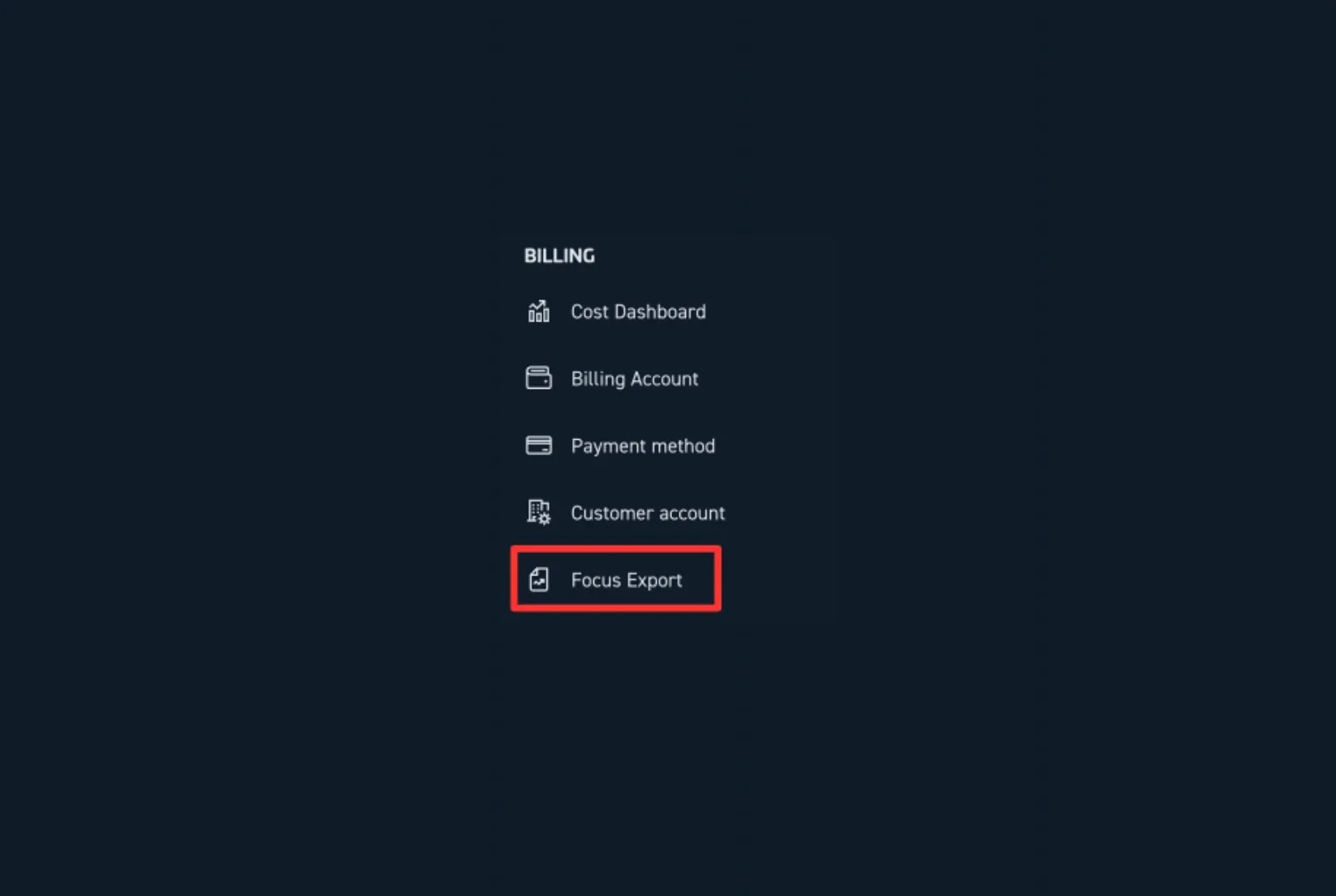
Picture 2: Step 1 – open FOCUS schedule view.
Ensure you meet all prerequisites, including enabling Object Storage, creating a bucket, and granting access.
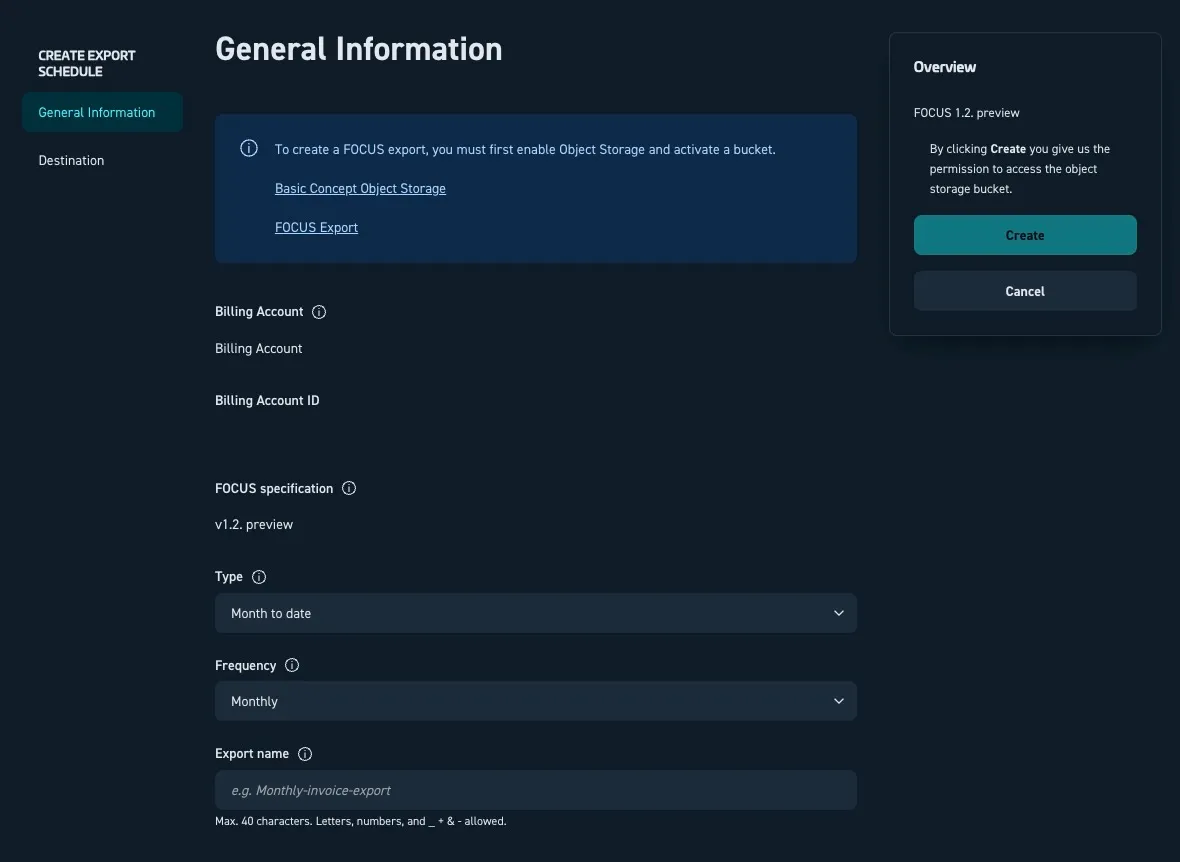
Picture 3: Step 2 – create the schedule for your billing account.
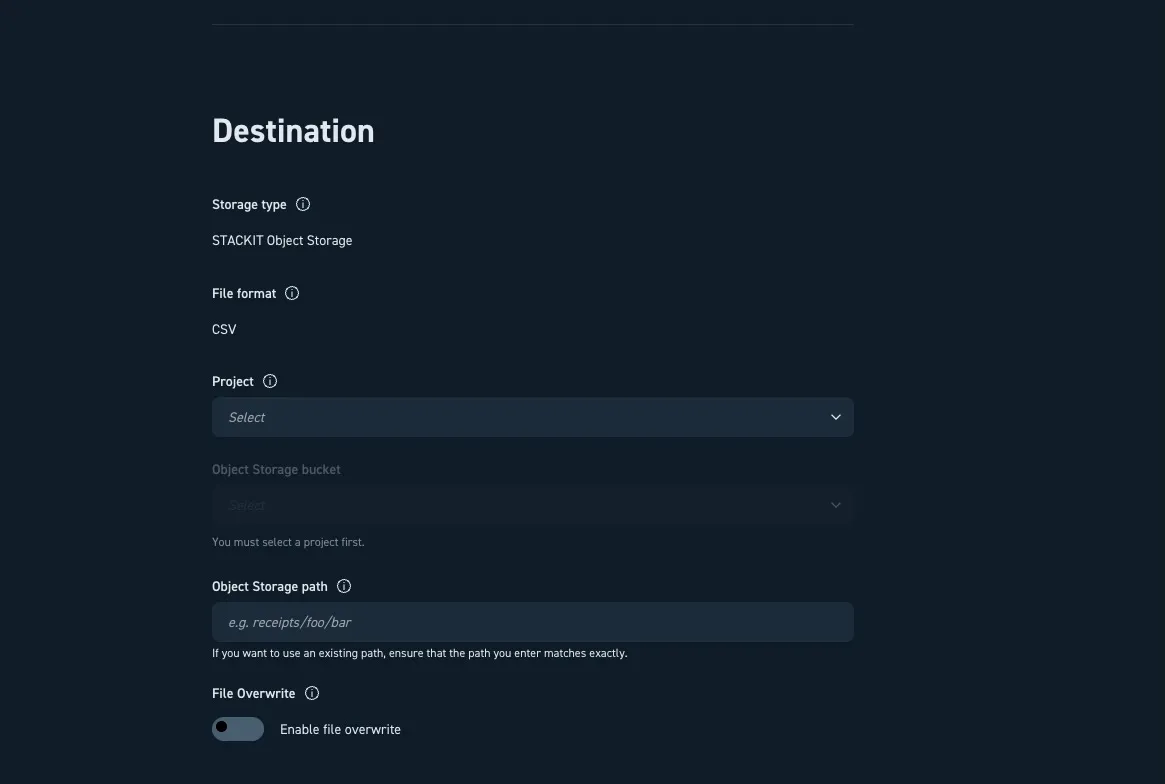
Picture 4: Step 3 – enter details to store the FOCUS report in your Object Storage.
Once you create the schedule, STACKIT delivers the FOCUS report to your specified Object Storage bucket the next day.
Store the FOCUS report in Object Storage
Section titled “Store the FOCUS report in Object Storage”To store the FOCUS report in your Object Storage, STACKIT requires access to the Object Storage data plane. STACKIT achieves this through the following process:
- STACKIT creates a service account using the
stackit-focusprefix. - STACKIT assigns the
object-storage.adminrole to the service account. - The service account creates a new credential group within the Object Storage control plane. The credential group name follows the schema
focus-<random id>. - STACKIT creates an access key inside the credential group.
- STACKIT uses this access key to place the FOCUS file into your provided bucket.
Access and permissions
Section titled “Access and permissions”You can find the FOCUS report section in the side navigation menu at the customer account level. To see this navigation option, you must have the appropriate role assigned to your user. The role must be assigned to the users on the customer account level.
To assign a role, open the side navigation, select IAM and Management, and then select Access. You must assign one of the following roles to access cost and billing data:
| Access level | Role | Rights |
|---|---|---|
| Customer Account | Owner (General Roles) | Read and write schedules |
| Customer Account | Cost Management Cost Admin (Product Roles) | Read and write schedules |
| Customer Account | Cost Management Cost Reader (Product Roles) | Read schedules |
Download the FOCUS report
Section titled “Download the FOCUS report”STACKIT provides the FOCUS report daily at 12:00 UTC. You cannot download FOCUS reports directly through the STACKIT Cloud Portal. To access your report, connect to the STACKIT Object Storage instance programmatically or by using a standard S3-compatible file transfer client. The STACKIT Object Storage is S3 compatible.
STACKIT stores the FOCUS report according to your schedule settings.
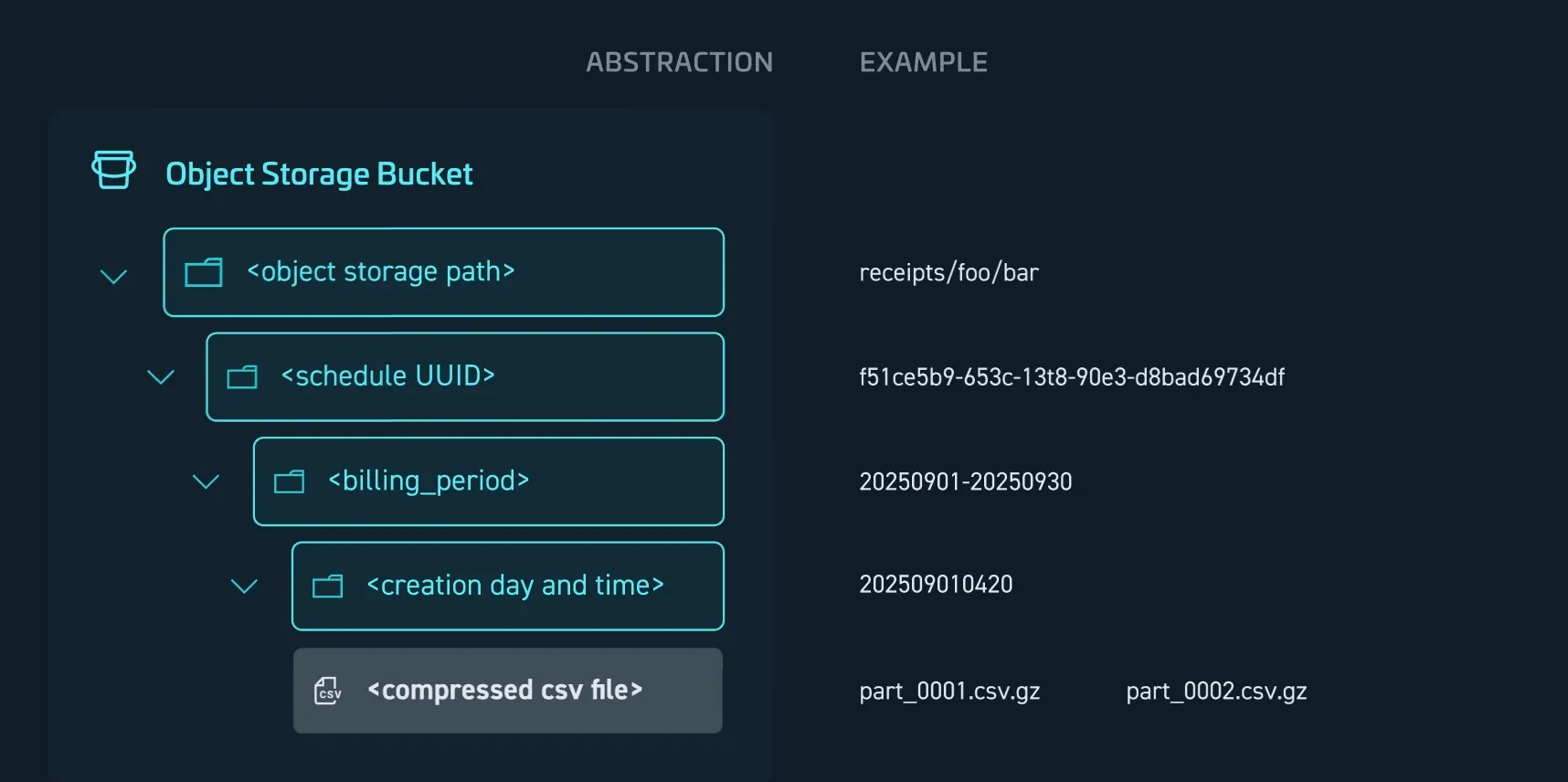
Picture 5: FOCUS Report storing schema for daily creation without overwriting
The following table explains the storage path placeholders:
| Placeholder | Description | Example |
|---|---|---|
<object storage path> | The bucket location defined by the user. | receipts/foo/bar |
<schedule UUID> | A folder created for the schedule. The folder name contains the schedule UUID. | f51ce5b9-653c-13t8-90e3-d8bad69734df |
<billing_period> | Defines the period the report covers, using the format yyyymmdd-to:yyyymmdd. | 20250901-20250930 |
<creation day and time> | Specifies when the folder was generated, using the format yyyymmddhhmm | 202509010420 |
<compressed CSV file> | The actual report file(s), which can be one or multiple compressed CSV files. | part_0001.csv.gz |
The compressed CSV file name is predefined and cannot be changed. The filename consists of a day and time indicator which is followed by the incrementing numerical value.
The first files contains _0001.csv.gz. After one million records the report is split and an additional file is created. Those additional files contain _0002.csv.gz, _0003.csv.gz and so on.
Example FOCUS report
Section titled “Example FOCUS report”To help you familiarize yourself with the report structure and content, you can download an example FOCUS report.
Download FOCUS example