Install the Server Agent on a running server
Last updated on
This documentation describes how to install the STACKIT Server Agent manually on an already existing and running server with scripts.
If you prefer to install the STACKIT Server Agent with the STACKIT Portal, refer to this documentation: Install the STACKIT Server Agent with Portal.
If you prefer to install the STACKIT Server Agent with the STACKIT IaaS API, STACKIT CLI or STACKIT Terraform, refer to this documentation: Install the STACKIT Server Agent with API.
Installing the STACKIT Server Agent on an running server (Linux)
Section titled “Installing the STACKIT Server Agent on an running server (Linux)”-
Logon to your server remotely. Use a method that includes a clipboard functionality, e. g. Remote Desktop Connection.
-
Open a shell.
-
Optional: Verify the signature
You can verify the GPG signature of the STACKIT Server Agent package with the following scripts:- Linux, RPM-based (Fedora, RedHat)
Source file: RPM (Fedora/RedHat based)
#!/bin/bash#Download GPG public keycurl https://stackit-server-agent.object.storage.[region].onstackit.cloud/stackit-server-agent.gpg -o /tmp/stackit-server-agent.gpg### Install dependenciesyum install gnupg -y### Import GPG Public keygpg --import /tmp/stackit-server-agent.gpg### Download STACKIT Server Agentcurl http://169.254.169.254/stackit/v1/server-agent/amd64/rpm -o /tmp/stackit-server-agent.rpm### Download the package signature filecurl https://stackit-server-agent.object.storage.[region].onstackit.cloud/stackit-server-agent.rpm.sig -o /tmp/stackit-server-agent.rpm.sigif gpg --verify /tmp/stackit-server-agent.rpm.sig /tmp/stackit-server-agent.rpmthenecho "The STACKIT Server Agent is verified successfully"elseecho "The STACKIT Server Agent is not verified successfully"rm -rf /tmp/stackit-server-agent.gpg /tmp/stackit-server-agent.rpm.sig /tmp/stackit-server-agent.rpmexit 1firm -rf /tmp/stackit-server-agent.gpg /tmp/stackit-server-agent.rpm.sig- Linux, DEB-based (Debian, Ubuntu)
Source file: DEB (Debian based)
#!/bin/bash#Download GPG public keycurl https://stackit-server-agent.object.storage.[region].onstackit.cloud/stackit-server-agent.gpg -o /tmp/stackit-server-agent.gpg### Install dependenciesapt-get update && apt-get install gnupg -y### Import GPG Public keygpg --import /tmp/stackit-server-agent.gpg### Download STACKIT Server Agentcurl http://169.254.169.254/stackit/v1/server-agent/amd64/deb -o /tmp/stackit-server-agent.deb### Download the package signature filecurl https://stackit-server-agent.object.storage.[region].onstackit.cloud/stackit-server-agent.deb.sig -o /tmp/stackit-server-agent.deb.sigif gpg --verify /tmp/stackit-server-agent.deb.sig /tmp/stackit-server-agent.debthenecho "The STACKIT Server Agent is verified successfully"elseecho "The STACKIT Server Agent is not verified successfully"rm -rf /tmp/stackit-server-agent.deb /tmp/stackit-server-agent.deb.sig /tmp/stackit-server-agent.gpgexit 1firm -rf /tmp/stackit-server-agent.gpg /tmp/stackit-server-agent.deb.sigOnce the package is successfully verified you can install it by running:
Source file: RPM (Fedora/RedHat based)Terminal window yum localinstall /tmp/stackit-server-agent.rpm -yor
Source file: DEB (Debian based)Terminal window dpkg -i /tmp/stackit-server-agent.deb - Linux, RPM-based (Fedora, RedHat)
-
Download and install the STACKIT Server Agent (without GPG verification)
Copy and paste the script into the shell and run it:- Linux, RPM-based (Fedora, RedHat)
Source file: RPM (Fedora/RedHat based)
#!/bin/bash### Download STACKIT Server Agentcurl http://169.254.169.254/stackit/v1/server-agent/amd64/rpm -o /tmp/stackit-server-agent.rpm### Install the Agentyum localinstall /tmp/stackit-server-agent.rpm -y### Cleaning uprm -rf /tmp/stackit-server-agent.rpm- Linux, DEB-based (Debian, Ubuntu)
Source file: DEB (Debian based)
#!/bin/bash### Download STACKIT Server Agentcurl http://169.254.169.254/stackit/v1/server-agent/amd64/deb -o /tmp/stackit-server-agent.deb### Install the Agentdpkg -i /tmp/stackit-server-agent.deb### Cleaning uprm -rf /tmp/stackit-server-agent.deb - Linux, RPM-based (Fedora, RedHat)
-
If the installation was successful, check if the service is running:
systemctl status stackit-server-agent.service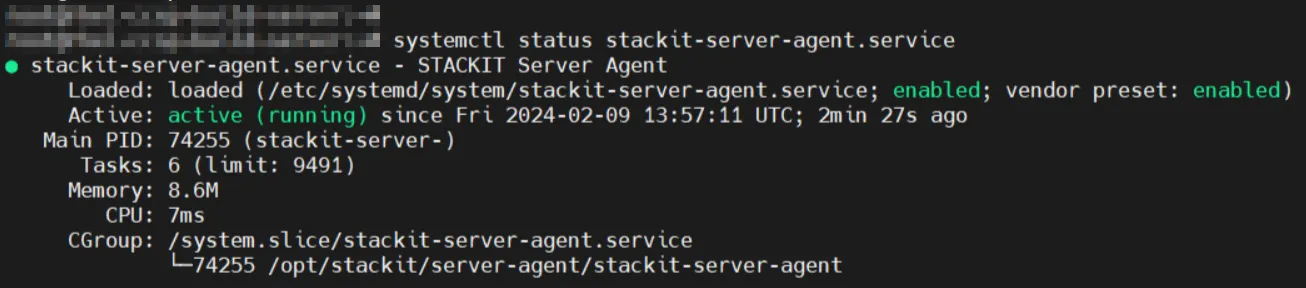
The STACKIT Server Agent is now fully configured and can accept commands remotely and run them locally on your system.
Installing the STACKIT Server Agent on a running server (Windows)
Section titled “Installing the STACKIT Server Agent on a running server (Windows)”-
Logon to your server remotely. Use a method that includes a clipboard functionality, e. g. Remote Desktop Connection.
-
Start PowerShell ISE with elevated permissions.
-
Copy and paste the script into the shell and run the script.
Source file: MSITerminal window ## Download STACKIT Server AgentNew-Item -ItemType Directory -Path "C:\ProgramData\STACKIT\ServerAgent" -ForceInvoke-WebRequest -Uri "http://169.254.169.254/stackit/v1/server-agent/amd64/msi" -OutFile "C:\ProgramData\STACKIT\ServerAgent\STACKITServerAgent.msi"### Install the AgentStart-Process -FilePath "C:\Windows\System32\msiexec.exe" -ArgumentList "/i C:\ProgramData\STACKIT\ServerAgent\STACKITServerAgent.msi /quiet /l*v C:\Windows\Temp\STACKITServerAgent_install.log" -NoNewWindow -Wait -
After successful installation, check if the service is running. Open the PowerShell and run the following command:
Get-Service STACKITServerAgentAlternatively check the status in the Service tab of the task manager:

The STACKIT Server Agent is now fully configured and can be used to run commands.